

kagi search
Search Kagi and return structured results in JSON or human-readable format.
Synopsis
kagi search [OPTIONS] <QUERY>Description
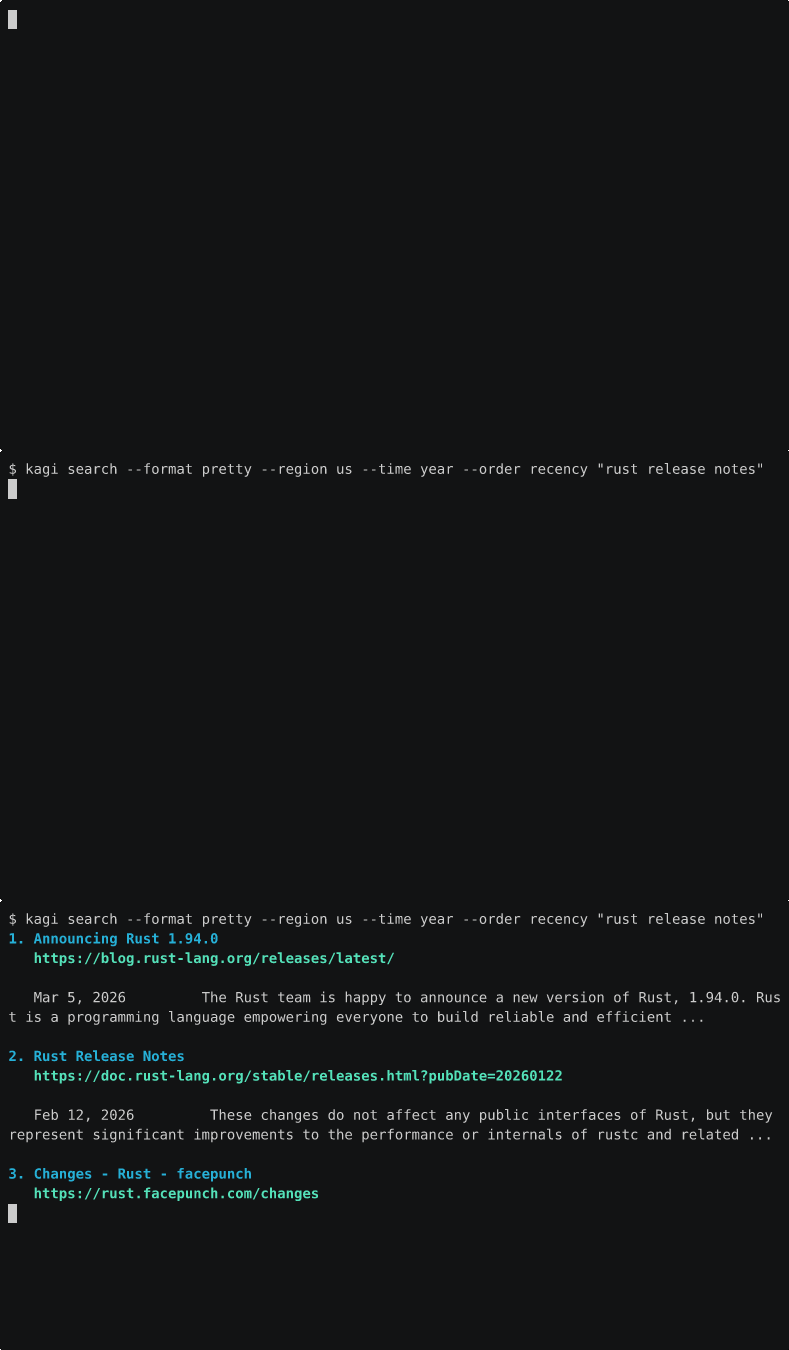
kagi search is the main search command. By default it emits JSON for scripts and agents. Use --format pretty for terminal reading.
There are now two search modes:
- V1 API search uses
KAGI_API_KEYwithBearerauth against/api/v1/searchwhen[auth.preferred_auth] = "api"or when no session token is configured. The CLI sends OpenAPI-compatibleregion,after, andbeforefilters on this path. - Subscriber search uses Kagi's authenticated HTML/session search path with
KAGI_SESSION_TOKEN. This remains the default when a session token is configured and handles web-product-only options.
This matters because some CLI flags map to the V1 OpenAPI contract and some are web-product-only. --region, --from-date, and --to-date can use the V1 API path. --lens, --time, --order, --verbatim, and personalization flags require KAGI_SESSION_TOKEN.
--snap works in either mode. It simply prefixes your query with a snap shortcut before the request is built.
Authentication
Base Search
Default: KAGI_SESSION_TOKEN
Optional API-first mode: set [auth.preferred_auth] = "api"
Plain base search keeps the existing repo behavior:
- default session-first search when a session token is available
- API-first only when you configure
[auth.preferred_auth] = "api"and provideKAGI_API_KEY - session fallback only when the API path was selected first and rejected, including
429 Too Many Requestsand quota-style API failures
Session-Only Search Options
Required: KAGI_SESSION_TOKEN
Any of these flags make the request session-only:
--lens--time--order--verbatim--personalized--no-personalized
--region, --from-date, and --to-date use the V1 Search API filters object when the request is routed through KAGI_API_KEY.
Options
<QUERY> (Required)
The search query string.
kagi search "rust programming language"
kagi search "site:github.com rust cli"
--format <FORMAT>
Output format.
Possible values:
json- pretty JSONtoon- token-efficient structured output for LLM contextcompact- minified JSONpretty- terminal-friendly outputmarkdown- markdown list outputcsv- CSV table output
--no-color
Disable ANSI colors in --format pretty.
--snap <SNAP>
Prefix the query with a snap shortcut. reddit becomes @reddit QUERY. Values may be supplied with or without the leading @.
kagi search --snap reddit "rust async runtime"
kagi search --snap @map "coffee near london bridge"
--lens <INDEX_OR_NAME>
Scope search to one of your enabled Kagi lenses. Numeric values keep the existing index behavior. Non-numeric values are matched against enabled lens names exactly at runtime, then resolved to the current account-specific numeric position before search.
kagi search --lens 2 "developer documentation"
kagi search --lens "Rust Docs" "borrow checker examples"
If a name is missing, disabled, or duplicated, the command fails before search and points you to kagi lens list or the numeric index path. Numeric-looking names are treated as numeric indexes.
--region <REGION>
Restrict results to a Kagi region code such as us, gb, jp, or no_region.
kagi search --region us "rust conferences"
kagi search --region no_region "rust ownership"
--time <WINDOW>
Restrict results to a recent update window.
Possible values:
dayweekmonthyear
kagi search --time week "rust release notes"--from-date <YYYY-MM-DD>
Restrict results to pages updated on or after the given date.
--to-date <YYYY-MM-DD>
Restrict results to pages updated on or before the given date.
kagi search --from-date 2026-01-01 --to-date 2026-03-01 "rust compiler"Important: --time cannot be combined with --from-date or --to-date.
--order <ORDER>
Reorder results using Kagi's live HTML search sort options.
Possible values:
defaultrecencywebsitetrackers
kagi search --order recency "rust changelog"--verbatim
Enable verbatim search for this request.
kagi search --verbatim "\"rust async runtime\""--personalized
Force personalized search on for this request.
--no-personalized
Force personalized search off for this request.
kagi search --no-personalized "rust web framework"--template <TEMPLATE>
Render each result with a lightweight template instead of a built-in format. Supported placeholders are {{rank}}, {{title}}, {{url}}, and {{snippet}}.
kagi search "rust crates" --template '{{rank}}. {{title}} - {{url}}'--local-cache
Store and reuse the response in the local cache under ~/.cache/kagi-cli or KAGI_CACHE_DIR.
--cache-ttl <SECONDS>
Override the local cache TTL. Search defaults to 900 seconds when --local-cache is enabled.
--follow <N>
Summarize the top N result URLs with the subscriber summarizer and print a JSON envelope containing the original search response plus per-result summaries.
kagi search "rust async runtime tradeoffs" --follow 3--follow requires KAGI_SESSION_TOKEN because it uses the subscriber summarizer.
--limit <N>
Cap the number of results returned. On the V1 API path this is sent as the OpenAPI limit field. On the subscriber web-product path, truncation happens locally after Kagi's response is received. Combine with --follow to summarize only the top of the capped list.
kagi search "rust async runtime tradeoffs" --limit 5--news
Search the News tab of kagi.com (kagi.com/news?q=...) instead of web search. Returns articles grouped into story clusters (multiple sources covering the same story share a cluster). Forces session-token auth.
kagi search "iran" --news
kagi search "iran" --news --time day --order recency --format pretty
Supported flags with --news: --region, --time (day, week, month only -- not year), --order (default, recency, website only -- not trackers), --limit, --format, --local-cache, --cache-ttl.
Rejected flags with --news: --lens, --snap, --from-date, --to-date, --verbatim, --personalized, --no-personalized, --follow, --template. Each produces a clear error.
The JSON shape is NewsSearchResponse, distinct from web search. See Output Format below.
Not Supported as Runtime Flags
safe_search is currently an account setting, not a search-time flag in this CLI. Configure it in the Kagi web settings instead of expecting kagi search to override it per request.
Output Format
The search response shape is unchanged:
{
  "data": [
    {
      "t": 0,
      "rank": 1,
      "title": "Rust Programming Language",
      "url": "https://www.rust-lang.org",
      "snippet": "A language empowering everyone to build reliable and efficient software.",
      "published": null
    }
  ]
}
With --news, the response shape is different -- clusters of news articles:
{
  "query": "iran",
  "clusters": [
    {
      "items": [
        {
          "title": "Lead headline",
          "url": "https://www.example.com/article",
          "source": "example.com",
          "time_relative": "2 hours ago",
          "snippet": "Optional snippet text.",
          "paywall": false,
          "image_url": "https://img.example/lead.jpg"
        }
      ]
    }
  ]
}
time_relative is a verbatim string like "2 hours ago" or "Yesterday"; the News page does not expose absolute timestamps. Cluster ordering reflects Kagi's page order. Single-item clusters represent ungrouped articles at the top of the page.
Examples
Plain base search
kagi search "rust programming language"Snap-prefixed search
kagi search --snap reddit "rust async runtime"Human-readable output
kagi search --format pretty "rust programming language"Custom template output
kagi search "rust cli" --template '{{rank}} {{title}} {{url}}'Region-aware search
kagi search --region us --format pretty "rust conferences"Recent results
kagi search --time month --order recency "rust release notes"Custom date range
kagi search --from-date 2026-01-01 --to-date 2026-03-01 "rust async runtime"Verbatim plus personalization control
kagi search --verbatim --no-personalized "\"rust book ownership\""Lens plus filters
kagi search --lens 2 --region us --time year "developer documentation"News-tab search
kagi search "iran" --news --time day --format prettyProcessing Results
# Extract URLs
kagi search "rust" | jq -r '.data[].url'

# Inspect related search metadata when the API returns it
kagi search "rust" | jq '.related_searches'

# Get first result
kagi search "rust" | jq -r '.data[0].title'

# Human-readable markdown
kagi search --format markdown "rust ownership"
Exit Codes
| Code | Meaning |
|---|---|
| 0 | Success |
| 1 | Error - see stderr |
Common Errors
this search option requires KAGI_SESSION_TOKEN- you used a web-product-only search option without a session tokensearch --time cannot be combined with --from-date or --to-date- choose a preset window or a custom date rangesearch --from-date must use YYYY-MM-DD format- dates must be zero-padded ISO dateslens named 'foo' was not found- named lens search matches enabled lens names exactly. Runkagi lens listlens name 'foo' is ambiguous- multiple lenses have that exact name. Use the numeric indexlens named 'foo' is disabled- enable it withkagi lens enable <ID_OR_NAME>or choose an enabled lenslens 'foo' must be a numeric index- internal numeric validation still applies after named lenses are resolved
Related Commands
kagi batch- run multiple searches with the same search filters and optional--snapkagi lens- manage reusable search scopeskagi assistant- continue research with Kagi Assistantkagi auth- inspect which token path will be used