> ## Documentation Index
> Fetch the complete documentation index at: https://kagi.micr.dev/llms.txt
> Use this file to discover all available pages before exploring further.
# search
> Complete reference for *kagi* search command - syntax, snaps, filters, authentication, output formats, and examples.
# `kagi search`
Search Kagi and return structured results in JSON or human-readable format.
 ## Synopsis
```bash theme={null}
kagi search [OPTIONS]
```
## Description
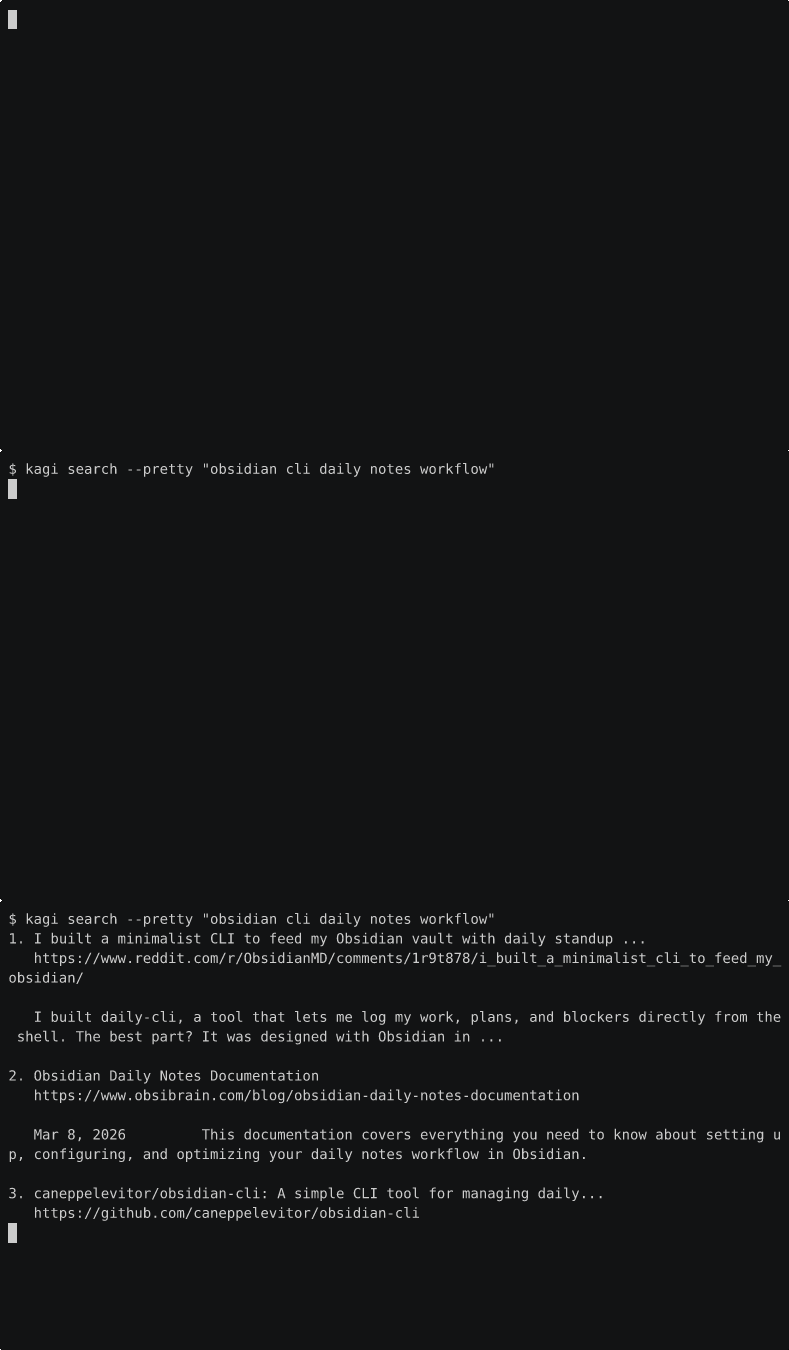
`kagi search` is the main search command. By default it emits JSON for scripts and agents. Use `--format pretty` for terminal reading.
There are now two search modes:
* **V1 API search** uses `KAGI_API_KEY` with `Bearer` auth against `/api/v1/search` when `[auth.preferred_auth] = "api"` or when no session token is configured. The CLI sends OpenAPI-compatible `region`, `after`, and `before` filters on this path.
* **Subscriber search** uses Kagi's authenticated HTML/session search path with `KAGI_SESSION_TOKEN`. This remains the default when a session token is configured and handles web-product-only options.
This matters because some CLI flags map to the V1 OpenAPI contract and some are web-product-only. `--region`, `--from-date`, and `--to-date` can use the V1 API path. `--lens`, `--time`, `--order`, `--verbatim`, and personalization flags require `KAGI_SESSION_TOKEN`.
`--snap` works in either mode. It simply prefixes your query with a snap shortcut before the request is built.
## Authentication
### Base Search
**Default:** `KAGI_SESSION_TOKEN`
**Optional API-first mode:** set `[auth.preferred_auth] = "api"`
Plain base search keeps the existing repo behavior:
* default session-first search when a session token is available
* API-first only when you configure `[auth.preferred_auth] = "api"` and provide `KAGI_API_KEY`
* session fallback only when the API path was selected first and rejected, including `429 Too Many Requests` and quota-style API failures
### Session-Only Search Options
**Required:** `KAGI_SESSION_TOKEN`
Any of these flags make the request session-only:
* `--lens`
* `--time`
* `--order`
* `--verbatim`
* `--personalized`
* `--no-personalized`
`--region`, `--from-date`, and `--to-date` use the V1 Search API `filters` object when the request is routed through `KAGI_API_KEY`.
## Options
### `` (Required)
The search query string.
```bash theme={null}
kagi search "rust programming language"
kagi search "site:github.com rust cli"
```
### `--format `
Output format.
Possible values:
* `json` - pretty JSON
* `toon` - token-efficient structured output for LLM context
* `compact` - minified JSON
* `pretty` - terminal-friendly output
* `markdown` - markdown list output
* `csv` - CSV table output
### `--no-color`
Disable ANSI colors in `--format pretty`.
### `--snap `
Prefix the query with a snap shortcut. `reddit` becomes `@reddit QUERY`. Values may be supplied with or without the leading `@`.
```bash theme={null}
kagi search --snap reddit "rust async runtime"
kagi search --snap @map "coffee near london bridge"
```
### `--lens `
Scope search to one of your enabled Kagi lenses. Numeric values keep the existing index behavior. Non-numeric values are matched against enabled lens names exactly at runtime, then resolved to the current account-specific numeric position before search.
```bash theme={null}
kagi search --lens 2 "developer documentation"
kagi search --lens "Rust Docs" "borrow checker examples"
```
If a name is missing, disabled, or duplicated, the command fails before search and points you to `kagi lens list` or the numeric index path. Numeric-looking names are treated as numeric indexes.
### `--region `
Restrict results to a Kagi region code such as `us`, `gb`, `jp`, or `no_region`.
```bash theme={null}
kagi search --region us "rust conferences"
kagi search --region no_region "rust ownership"
```
### `--time `
Restrict results to a recent update window.
Possible values:
* `day`
* `week`
* `month`
* `year`
```bash theme={null}
kagi search --time week "rust release notes"
```
### `--from-date `
Restrict results to pages updated on or after the given date.
### `--to-date `
Restrict results to pages updated on or before the given date.
```bash theme={null}
kagi search --from-date 2026-01-01 --to-date 2026-03-01 "rust compiler"
```
**Important:** `--time` cannot be combined with `--from-date` or `--to-date`.
### `--order `
Reorder results using Kagi's live HTML search sort options.
Possible values:
* `default`
* `recency`
* `website`
* `trackers`
```bash theme={null}
kagi search --order recency "rust changelog"
```
### `--verbatim`
Enable verbatim search for this request.
```bash theme={null}
kagi search --verbatim "\"rust async runtime\""
```
### `--personalized`
Force personalized search on for this request.
### `--no-personalized`
Force personalized search off for this request.
```bash theme={null}
kagi search --no-personalized "rust web framework"
```
### `--template `
Render each result with a lightweight template instead of a built-in format. Supported placeholders are `{{rank}}`, `{{title}}`, `{{url}}`, and `{{snippet}}`.
```bash theme={null}
kagi search "rust crates" --template '{{rank}}. {{title}} - {{url}}'
```
### `--local-cache`
Store and reuse the response in the local cache under `~/.cache/kagi-cli` or `KAGI_CACHE_DIR`.
### `--cache-ttl `
Override the local cache TTL. Search defaults to 900 seconds when `--local-cache` is enabled.
### `--follow `
Summarize the top `N` result URLs with the subscriber summarizer and print a JSON envelope containing the original search response plus per-result summaries.
```bash theme={null}
kagi search "rust async runtime tradeoffs" --follow 3
```
`--follow` requires `KAGI_SESSION_TOKEN` because it uses the subscriber summarizer.
### `--limit `
Cap the number of results returned. On the V1 API path this is sent as the OpenAPI `limit` field. On the subscriber web-product path, truncation happens locally after Kagi's response is received. Combine with `--follow` to summarize only the top of the capped list.
```bash theme={null}
kagi search "rust async runtime tradeoffs" --limit 5
```
### `--news`
Search the News tab of `kagi.com` (`kagi.com/news?q=...`) instead of web search. Returns articles grouped into story clusters (multiple sources covering the same story share a cluster). Forces session-token auth.
```bash theme={null}
kagi search "iran" --news
kagi search "iran" --news --time day --order recency --format pretty
```
Supported flags with `--news`: `--region`, `--time` (day, week, month only -- not `year`), `--order` (default, recency, website only -- not `trackers`), `--limit`, `--format`, `--local-cache`, `--cache-ttl`.
Rejected flags with `--news`: `--lens`, `--snap`, `--from-date`, `--to-date`, `--verbatim`, `--personalized`, `--no-personalized`, `--follow`, `--template`. Each produces a clear error.
The JSON shape is `NewsSearchResponse`, distinct from web search. See [Output Format](#output-format) below.
## Not Supported as Runtime Flags
`safe_search` is currently an account setting, not a search-time flag in this CLI. Configure it in the Kagi web settings instead of expecting `kagi search` to override it per request.
## Output Format
The search response shape is unchanged:
```json theme={null}
{
"data": [
{
"t": 0,
"rank": 1,
"title": "Rust Programming Language",
"url": "https://www.rust-lang.org",
"snippet": "A language empowering everyone to build reliable and efficient software.",
"published": null
}
]
}
```
With `--news`, the response shape is different -- clusters of news articles:
```json theme={null}
{
"query": "iran",
"clusters": [
{
"items": [
{
"title": "Lead headline",
"url": "https://www.example.com/article",
"source": "example.com",
"time_relative": "2 hours ago",
"snippet": "Optional snippet text.",
"paywall": false,
"image_url": "https://img.example/lead.jpg"
}
]
}
]
}
```
`time_relative` is a verbatim string like `"2 hours ago"` or `"Yesterday"`; the News page does not expose absolute timestamps. Cluster ordering reflects Kagi's page order. Single-item clusters represent ungrouped articles at the top of the page.
## Examples
### Plain base search
```bash theme={null}
kagi search "rust programming language"
```
### Snap-prefixed search
```bash theme={null}
kagi search --snap reddit "rust async runtime"
```
### Human-readable output
```bash theme={null}
kagi search --format pretty "rust programming language"
```
### Custom template output
```bash theme={null}
kagi search "rust cli" --template '{{rank}} {{title}} {{url}}'
```
### Region-aware search
```bash theme={null}
kagi search --region us --format pretty "rust conferences"
```
### Recent results
```bash theme={null}
kagi search --time month --order recency "rust release notes"
```
### Custom date range
```bash theme={null}
kagi search --from-date 2026-01-01 --to-date 2026-03-01 "rust async runtime"
```
### Verbatim plus personalization control
```bash theme={null}
kagi search --verbatim --no-personalized "\"rust book ownership\""
```
### Lens plus filters
```bash theme={null}
kagi search --lens 2 --region us --time year "developer documentation"
```
### News-tab search
```bash theme={null}
kagi search "iran" --news --time day --format pretty
```
## Processing Results
```bash theme={null}
# Extract URLs
kagi search "rust" | jq -r '.data[].url'
# Inspect related search metadata when the API returns it
kagi search "rust" | jq '.related_searches'
# Get first result
kagi search "rust" | jq -r '.data[0].title'
# Human-readable markdown
kagi search --format markdown "rust ownership"
```
## Exit Codes
| Code | Meaning |
| ---- | ------------------ |
| 0 | Success |
| 1 | Error - see stderr |
## Common Errors
* `this search option requires KAGI_SESSION_TOKEN` - you used a web-product-only search option without a session token
* `search --time cannot be combined with --from-date or --to-date` - choose a preset window or a custom date range
* `search --from-date must use YYYY-MM-DD format` - dates must be zero-padded ISO dates
* `lens named 'foo' was not found` - named lens search matches enabled lens names exactly. Run `kagi lens list`
* `lens name 'foo' is ambiguous` - multiple lenses have that exact name. Use the numeric index
* `lens named 'foo' is disabled` - enable it with `kagi lens enable ` or choose an enabled lens
* `lens 'foo' must be a numeric index` - internal numeric validation still applies after named lenses are resolved
## Related Commands
* `kagi batch` - run multiple searches with the same search filters and optional `--snap`
* `kagi lens` - manage reusable search scopes
* `kagi assistant` - continue research with Kagi Assistant
* `kagi auth` - inspect which token path will be used
## See Also
* [Authentication Guide](/guides/authentication)
* [lens](/commands/lens)
* [Auth Matrix](/reference/auth-matrix)
* [API and Product Coverage](/reference/coverage)
## Synopsis
```bash theme={null}
kagi search [OPTIONS]
```
## Description
`kagi search` is the main search command. By default it emits JSON for scripts and agents. Use `--format pretty` for terminal reading.
There are now two search modes:
* **V1 API search** uses `KAGI_API_KEY` with `Bearer` auth against `/api/v1/search` when `[auth.preferred_auth] = "api"` or when no session token is configured. The CLI sends OpenAPI-compatible `region`, `after`, and `before` filters on this path.
* **Subscriber search** uses Kagi's authenticated HTML/session search path with `KAGI_SESSION_TOKEN`. This remains the default when a session token is configured and handles web-product-only options.
This matters because some CLI flags map to the V1 OpenAPI contract and some are web-product-only. `--region`, `--from-date`, and `--to-date` can use the V1 API path. `--lens`, `--time`, `--order`, `--verbatim`, and personalization flags require `KAGI_SESSION_TOKEN`.
`--snap` works in either mode. It simply prefixes your query with a snap shortcut before the request is built.
## Authentication
### Base Search
**Default:** `KAGI_SESSION_TOKEN`
**Optional API-first mode:** set `[auth.preferred_auth] = "api"`
Plain base search keeps the existing repo behavior:
* default session-first search when a session token is available
* API-first only when you configure `[auth.preferred_auth] = "api"` and provide `KAGI_API_KEY`
* session fallback only when the API path was selected first and rejected, including `429 Too Many Requests` and quota-style API failures
### Session-Only Search Options
**Required:** `KAGI_SESSION_TOKEN`
Any of these flags make the request session-only:
* `--lens`
* `--time`
* `--order`
* `--verbatim`
* `--personalized`
* `--no-personalized`
`--region`, `--from-date`, and `--to-date` use the V1 Search API `filters` object when the request is routed through `KAGI_API_KEY`.
## Options
### `` (Required)
The search query string.
```bash theme={null}
kagi search "rust programming language"
kagi search "site:github.com rust cli"
```
### `--format `
Output format.
Possible values:
* `json` - pretty JSON
* `toon` - token-efficient structured output for LLM context
* `compact` - minified JSON
* `pretty` - terminal-friendly output
* `markdown` - markdown list output
* `csv` - CSV table output
### `--no-color`
Disable ANSI colors in `--format pretty`.
### `--snap `
Prefix the query with a snap shortcut. `reddit` becomes `@reddit QUERY`. Values may be supplied with or without the leading `@`.
```bash theme={null}
kagi search --snap reddit "rust async runtime"
kagi search --snap @map "coffee near london bridge"
```
### `--lens `
Scope search to one of your enabled Kagi lenses. Numeric values keep the existing index behavior. Non-numeric values are matched against enabled lens names exactly at runtime, then resolved to the current account-specific numeric position before search.
```bash theme={null}
kagi search --lens 2 "developer documentation"
kagi search --lens "Rust Docs" "borrow checker examples"
```
If a name is missing, disabled, or duplicated, the command fails before search and points you to `kagi lens list` or the numeric index path. Numeric-looking names are treated as numeric indexes.
### `--region `
Restrict results to a Kagi region code such as `us`, `gb`, `jp`, or `no_region`.
```bash theme={null}
kagi search --region us "rust conferences"
kagi search --region no_region "rust ownership"
```
### `--time `
Restrict results to a recent update window.
Possible values:
* `day`
* `week`
* `month`
* `year`
```bash theme={null}
kagi search --time week "rust release notes"
```
### `--from-date `
Restrict results to pages updated on or after the given date.
### `--to-date `
Restrict results to pages updated on or before the given date.
```bash theme={null}
kagi search --from-date 2026-01-01 --to-date 2026-03-01 "rust compiler"
```
**Important:** `--time` cannot be combined with `--from-date` or `--to-date`.
### `--order `
Reorder results using Kagi's live HTML search sort options.
Possible values:
* `default`
* `recency`
* `website`
* `trackers`
```bash theme={null}
kagi search --order recency "rust changelog"
```
### `--verbatim`
Enable verbatim search for this request.
```bash theme={null}
kagi search --verbatim "\"rust async runtime\""
```
### `--personalized`
Force personalized search on for this request.
### `--no-personalized`
Force personalized search off for this request.
```bash theme={null}
kagi search --no-personalized "rust web framework"
```
### `--template `
Render each result with a lightweight template instead of a built-in format. Supported placeholders are `{{rank}}`, `{{title}}`, `{{url}}`, and `{{snippet}}`.
```bash theme={null}
kagi search "rust crates" --template '{{rank}}. {{title}} - {{url}}'
```
### `--local-cache`
Store and reuse the response in the local cache under `~/.cache/kagi-cli` or `KAGI_CACHE_DIR`.
### `--cache-ttl `
Override the local cache TTL. Search defaults to 900 seconds when `--local-cache` is enabled.
### `--follow `
Summarize the top `N` result URLs with the subscriber summarizer and print a JSON envelope containing the original search response plus per-result summaries.
```bash theme={null}
kagi search "rust async runtime tradeoffs" --follow 3
```
`--follow` requires `KAGI_SESSION_TOKEN` because it uses the subscriber summarizer.
### `--limit `
Cap the number of results returned. On the V1 API path this is sent as the OpenAPI `limit` field. On the subscriber web-product path, truncation happens locally after Kagi's response is received. Combine with `--follow` to summarize only the top of the capped list.
```bash theme={null}
kagi search "rust async runtime tradeoffs" --limit 5
```
### `--news`
Search the News tab of `kagi.com` (`kagi.com/news?q=...`) instead of web search. Returns articles grouped into story clusters (multiple sources covering the same story share a cluster). Forces session-token auth.
```bash theme={null}
kagi search "iran" --news
kagi search "iran" --news --time day --order recency --format pretty
```
Supported flags with `--news`: `--region`, `--time` (day, week, month only -- not `year`), `--order` (default, recency, website only -- not `trackers`), `--limit`, `--format`, `--local-cache`, `--cache-ttl`.
Rejected flags with `--news`: `--lens`, `--snap`, `--from-date`, `--to-date`, `--verbatim`, `--personalized`, `--no-personalized`, `--follow`, `--template`. Each produces a clear error.
The JSON shape is `NewsSearchResponse`, distinct from web search. See [Output Format](#output-format) below.
## Not Supported as Runtime Flags
`safe_search` is currently an account setting, not a search-time flag in this CLI. Configure it in the Kagi web settings instead of expecting `kagi search` to override it per request.
## Output Format
The search response shape is unchanged:
```json theme={null}
{
"data": [
{
"t": 0,
"rank": 1,
"title": "Rust Programming Language",
"url": "https://www.rust-lang.org",
"snippet": "A language empowering everyone to build reliable and efficient software.",
"published": null
}
]
}
```
With `--news`, the response shape is different -- clusters of news articles:
```json theme={null}
{
"query": "iran",
"clusters": [
{
"items": [
{
"title": "Lead headline",
"url": "https://www.example.com/article",
"source": "example.com",
"time_relative": "2 hours ago",
"snippet": "Optional snippet text.",
"paywall": false,
"image_url": "https://img.example/lead.jpg"
}
]
}
]
}
```
`time_relative` is a verbatim string like `"2 hours ago"` or `"Yesterday"`; the News page does not expose absolute timestamps. Cluster ordering reflects Kagi's page order. Single-item clusters represent ungrouped articles at the top of the page.
## Examples
### Plain base search
```bash theme={null}
kagi search "rust programming language"
```
### Snap-prefixed search
```bash theme={null}
kagi search --snap reddit "rust async runtime"
```
### Human-readable output
```bash theme={null}
kagi search --format pretty "rust programming language"
```
### Custom template output
```bash theme={null}
kagi search "rust cli" --template '{{rank}} {{title}} {{url}}'
```
### Region-aware search
```bash theme={null}
kagi search --region us --format pretty "rust conferences"
```
### Recent results
```bash theme={null}
kagi search --time month --order recency "rust release notes"
```
### Custom date range
```bash theme={null}
kagi search --from-date 2026-01-01 --to-date 2026-03-01 "rust async runtime"
```
### Verbatim plus personalization control
```bash theme={null}
kagi search --verbatim --no-personalized "\"rust book ownership\""
```
### Lens plus filters
```bash theme={null}
kagi search --lens 2 --region us --time year "developer documentation"
```
### News-tab search
```bash theme={null}
kagi search "iran" --news --time day --format pretty
```
## Processing Results
```bash theme={null}
# Extract URLs
kagi search "rust" | jq -r '.data[].url'
# Inspect related search metadata when the API returns it
kagi search "rust" | jq '.related_searches'
# Get first result
kagi search "rust" | jq -r '.data[0].title'
# Human-readable markdown
kagi search --format markdown "rust ownership"
```
## Exit Codes
| Code | Meaning |
| ---- | ------------------ |
| 0 | Success |
| 1 | Error - see stderr |
## Common Errors
* `this search option requires KAGI_SESSION_TOKEN` - you used a web-product-only search option without a session token
* `search --time cannot be combined with --from-date or --to-date` - choose a preset window or a custom date range
* `search --from-date must use YYYY-MM-DD format` - dates must be zero-padded ISO dates
* `lens named 'foo' was not found` - named lens search matches enabled lens names exactly. Run `kagi lens list`
* `lens name 'foo' is ambiguous` - multiple lenses have that exact name. Use the numeric index
* `lens named 'foo' is disabled` - enable it with `kagi lens enable ` or choose an enabled lens
* `lens 'foo' must be a numeric index` - internal numeric validation still applies after named lenses are resolved
## Related Commands
* `kagi batch` - run multiple searches with the same search filters and optional `--snap`
* `kagi lens` - manage reusable search scopes
* `kagi assistant` - continue research with Kagi Assistant
* `kagi auth` - inspect which token path will be used
## See Also
* [Authentication Guide](/guides/authentication)
* [lens](/commands/lens)
* [Auth Matrix](/reference/auth-matrix)
* [API and Product Coverage](/reference/coverage)